Color comparison guide
Aqua vs Cyan: Are They the Same Color?
Yes: CSS aqua and CSS cyan are exactly the same color, #00FFFF, or rgb(0, 255, 255). Choosing one keyword instead of the other does not change the rendered color. Everyday product names may refer to different shades, so check the values when comparing physical items.
By Color Match · Updated
Values and text contrast
| Property | Aqua | Cyan |
|---|---|---|
| HEX | #00FFFF | #00FFFF |
| RGB | 0, 255, 255 | 0, 255, 255 |
| HSL | 180°, 100%, 50% | 180°, 100%, 50% |
| Against white | 1.254:1Normal text: Fail | 1.254:1Normal text: Fail |
| Against black | 16.748:1Normal text: AAA | 16.748:1Normal text: AAA |
Values use opaque sRGB colors. HSL is rounded for display and is not a perceptual color-difference score. Contrast classifications use the unrounded WCAG ratio.
Aqua and Cyan as text and background
Pair contrast: 1.000:1. Normal text: Fail. Large text: Fail.
These are identical colors. Text in one on a background of the other is invisible at full opacity, with a contrast ratio of 1:1.
WCAG AA requires 4.5:1 for normal text and 3:1 for large text; AAA requires 7:1 and 4.5:1 respectively. Large text is at least 18 pt (24 CSS px), or 14 pt (about 18.67 CSS px) when bold. These checks cover text contrast, not complete accessibility.
Renaming a selected option does not change its color
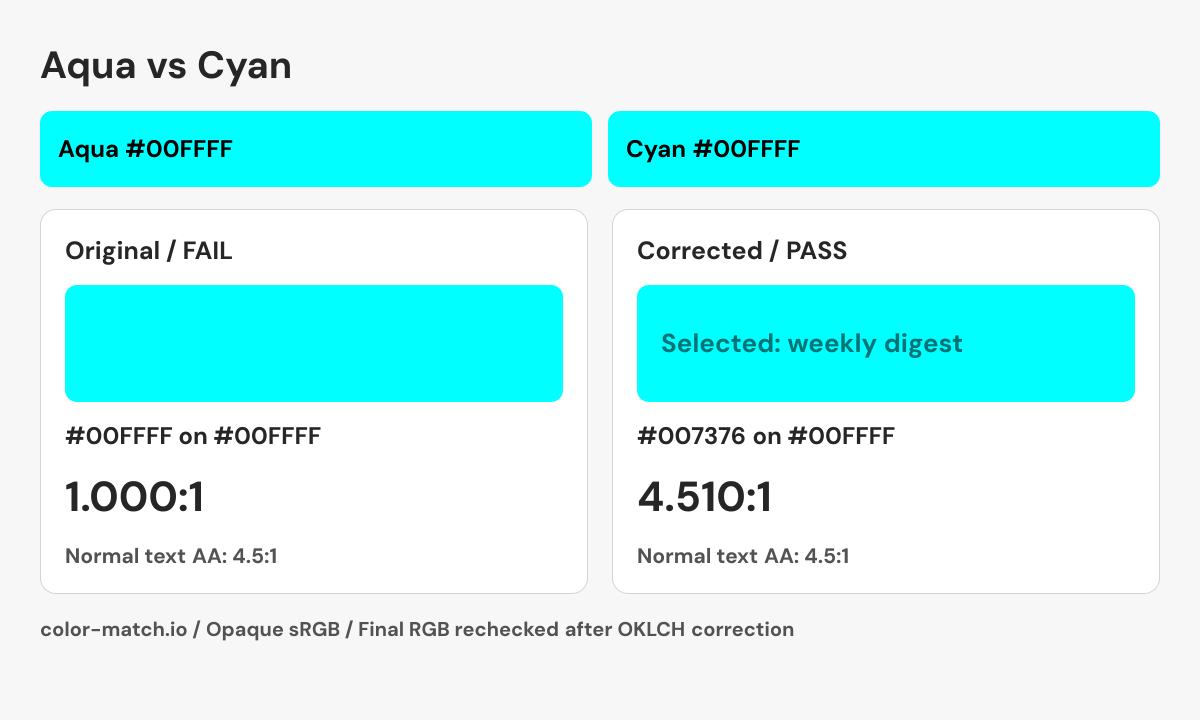
A developer changes a selected option from aqua to cyan, expecting a second shade. CSS resolves both names to #00FFFF, so the label and fill below initially become identical.
1.000:1 — Fail normal text AA
Different keyword names still produce an invisible 1:1 text pair.
Check #00FFFF on #00FFFF16.748:1 — Pass normal text AA
Black keeps the original cyan surface and supplies a readable label.
Check #000000 on #00FFFFChoose either CSS spelling consistently and use black or the darker cyan-derived label below. The adjusted HEX is a new color. It is not evidence of a difference between aqua and cyan, which remain exact aliases.
A correction you can reproduce
Change the foreground while keeping the background fixed. The OKLCH search returns a nearby passing candidate, then measures the final six-digit sRGB colors again. It does not guarantee the mathematically nearest color.
- Original pair
- #00FFFF on #00FFFF
- 1.000:1 — Fail normal text AA
- Corrected pair
- #007376 on #00FFFF
- 4.510:1 — Pass normal text AA
.example-label {
  color: #007376;
  background-color: #00FFFF;
}
This snippet contains the checked color pair. Apply the non-color checks below when building the real component.

Checks beyond the color pair
- Show a checkmark and the word “Selected”.
- Use a native checkbox or expose the corresponding checked state.
- Keep the selected state recognizable when colors are overridden by the operating system.
What changes when you switch the CSS keyword?
Changing color: aqua to color: cyan preserves the same specified sRGB color. Both have zero red and maximum green and blue channels. The duplicate names are part of the CSS named-color set, not two brightness levels. Keeping one spelling consistent in a project can make code searches and documentation easier, but that is a naming decision. It does not create a new palette color or a separate accessibility result.
Why aqua text on cyan disappears
Aqua against cyan has a contrast ratio of 1:1 because the colors are identical. That remains true even though the foreground and background use different names. Inspect the white and black comparisons to choose a readable label for an aqua surface. When using this bright color to indicate selection, add an outline, checkmark, or explicit label; replacing the aqua keyword with cyan cannot make a selected state distinguishable.
Aqua, cyan, and turquoise are not three CSS aliases
CSS turquoise is #40E0D0, which differs from #00FFFF in all three RGB channels. Teal is another separate keyword at #008080. Outside CSS, a shop may describe muted blue-green paint or fabric as aqua, and printing uses cyan as the name of an ink channel. Those contexts do not establish that the material matches this screen color. Compare the exact swatches for digital work and the actual samples or profile-managed proofs for physical production.
Sources and calculation method
CSS keyword values follow the W3C named-color table. A reference described as selected is an editorial swatch. Contrast is calculated from these exact values using WCAG relative luminance.